Introducing Moonlight: an AI personal assistant that works while you sleep
Moonlight is in beta. It reads your inbox, calendar, reviews, and Slack overnight, then hands you one short morning briefing to approve. Flat pricing at $9.99 or $24.99 a month, with a 14-day free trial and no credit card.

Moonlight is a personal assistant that works the night shift.
While you sleep, it reads your inbox, your calendar, your reviews, your Slack (and more to come, like Teams and Notion), and surfaces the handful of things that actually need your attention. It then drafts what a good response might look like, what emails can be filed and archived, and then writes a summary for you to easily scan from a 10k-foot view.
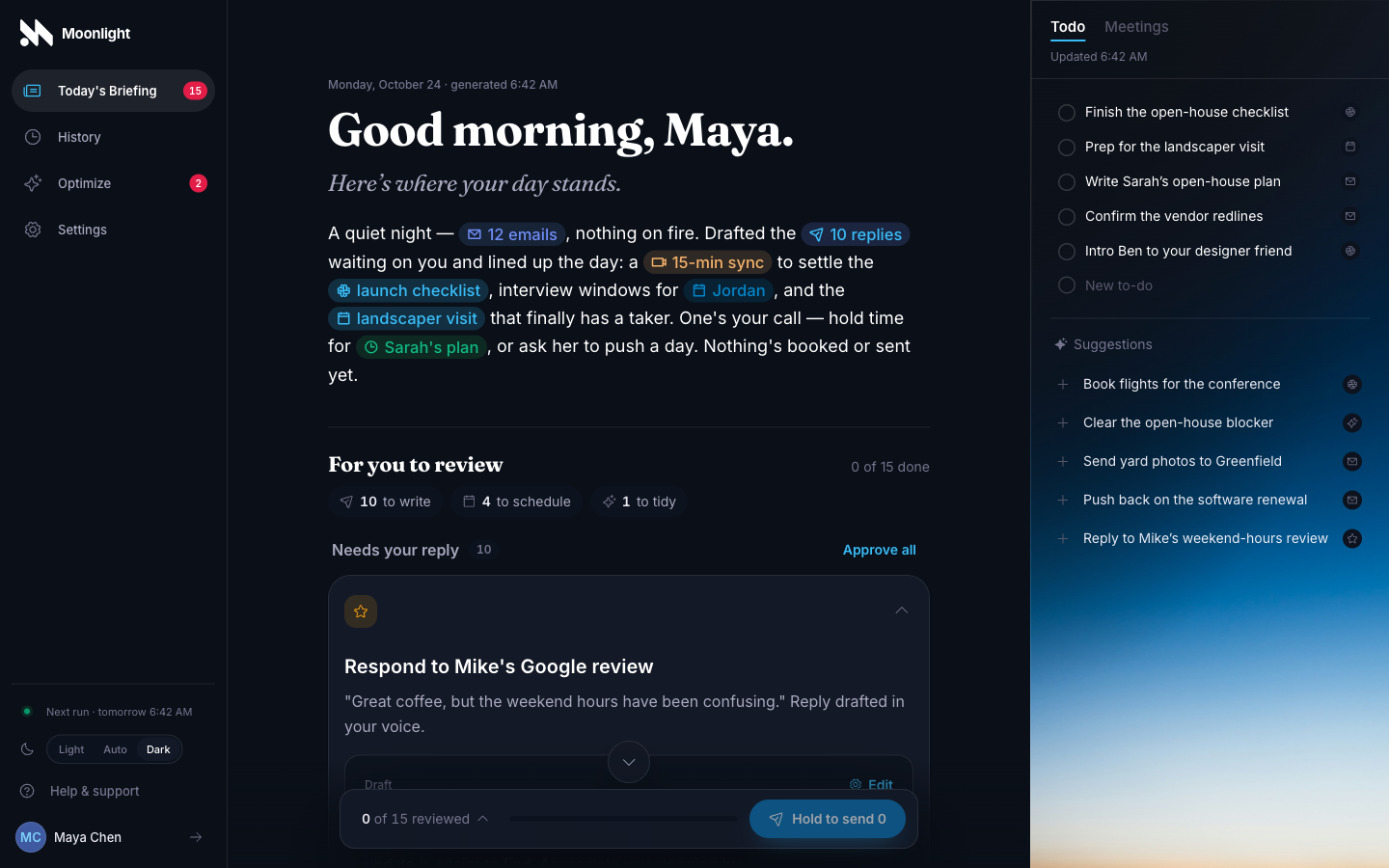
What does all that look like? In the morning you'll get one briefing from which you review Moonlight's suggested next-steps, whether that's sending an email or adding a suggested to-do for you to keep track of. For most mornings, that takes about two minutes.
What's more, rather than making you fill load an account of credits every time you want to do something, Moonlight's flagship model is a consistent cost of $9.99 a month, or $24.99 for the larger plan. That's the entire pricing schema for now, because it forces me to be efficient with the design. That being said, I plan to add pay-as-you-go pricing at a later date for power users who don't want to be constrained by the cost efficiency of the capped plans.
Why build another AI assistant
I've spent the last 6 months building software almost entirely alongside AI, something I wrote about earlier this year. In that post, I contemplated how the value in software engineering has been moving from knowing how to write the code (the syntax, the language, the framework, etc), to judging what the code should do (the product, the architecture, the security). Moonlight is what that idea looks like as a product.
But Moonlight goes further than just an experiment. Most AI-powered assistants I've tried land in one of two camps. The first hands you a chat box and a blinking cursor: it can do anything, so you decide everything. In this scenario, you didn't hire an assistant, you took a second job as its workflow designer (albeit in a language that makes you feel like an expert at times). The second goes the other direction and simply runs amok on your data and decision-making, effecitvely cutting you out of the equation. It sends the email, books the meeting, answers the review, and you find out afterward. By then, there's a good chance you're already doing damage control for some inevitable security breach, or retracting a badly worded email sent to a high-value client. Many people call it the future, but it's not one I want to contribute to.
Instead, I'm looking for what a good assistant actually does: they read everything, form an opinion, and get your approval on their plan before acting on your behalf. They do the tedious work and make some educated judgments about what you should do, but still hand you the part that was always yours — the final say.
That's the whole design of Moonlight, and I think what sets it apart.
What Moonlight does overnight
Every night runs in three passes:
- Read. Pull in what's new across your connected accounts since the last briefing.
- Sort. Separate the few things that need a decision from the pile that doesn't — receipts, newsletters, notifications, the automated mail nobody reads.
- Draft. For the things that need you, prepare a proposed action: a reply in your voice, a filing, a calendar response.
Then it stops because your judgment is the last 20% of context that's needed for true leverage. Each suggested action explains itself in a sentence and carries its proposed decision — approve, edit, or dismiss. Along with this is a plain-language recap of the noise, but with the signal elevated. If that weren't enough, a running to-do list that carries across mornings is always visible so you can keep track of your priorities throughout the day.
There's complicated dashboard, no folders, no prompt engineering, nothing you're required to configure beyond a profile and some rules that Moonlight should follow (if you think it needs it). While a mobile app is in the future, right now the webapp will work on your phone, because that's where most people read their first message of the day.
Minimal setup is the default, though, not the ceiling. When you do have a standing preference, you write it down in plain language through Optimize, a Max-only feature (always archive Slack notification emails, I will always reply directly via Slack) Moonlight respects that instruction.
You're always in control
You review every action before it happens. Every draft, every cleanup, every reply — you decide what happens next.
- Every draft is a proposal, not something already sent.
- Every cleanup is staged for review before it happens.
- Everything is surfaced for you to review in a quick, easily scannable interface.
This is intentional because I don't believe AI isn't meant to replace you; it's meant to support you.
Privacy by design
Privacy is a big deal to me. In a world where much of AI is training on your sensitive data, Moonlight isn't.
Your content is encrypted at rest, and the overnight work happens in a private, short-lived space that's discarded when it's finished. Our AI providers retain none of this information, as we have zero data retention enabled by default. The specifics are on the privacy page, in normal English.
In the future, I plan to add end-to-end encryption support so that your data and briefings are even more protected, including things like HIPAA support so that people in sensitive data professions can still benefit from the intelligence of Moonlight.
What it connects to today
Gmail, Google Calendar, Google Business Profile reviews, and Slack — the DMs and channels you pick, nothing else.
Inside the briefing, the work is split between focused agents you can switch on and off:
- Inbox Triage — routes every email and drafts replies to the real asks.
- Inbox Cleanup — groups newsletters and promotions and proposes filing them away.
- Calendar & Schedule — flags conflicts and gaps, and drafts responses to unanswered invitations for you to send.
- Reviews — surfaces new customer reviews and drafts a reply in your voice.
- Slack — finds the conversations waiting on you and drafts a response.
- Todo List — pulls the promises and follow-ups back out of the finished briefing.
More are landing regularly, and some might come and go. That's what the beta is for, and why your feedback matters the most.
What beta means here
The product works and the edges are still visible. Some mornings the drafts are uncannily good; some mornings one lands generic and you'll fix a sentence before approving. When that keeps happening, today's fix is a rule you write, not a model quietly learning your habits — Moonlight has no memory of you between briefings yet, and I'd rather say that plainly than imply otherwise. It's the next thing I want to build.
What beta does mean is that you can still shape it. Feedback comes straight to me, and the roadmap is short enough that a good suggestion ships the same week.
Beta also means that some integrations may not be verified yet. So, while you can use Google to sign-in and connect your accounts for Moonlight to read, you may get warned by Google that the app isn't verified yet. This is part of beta and will be resolved once we get certification (which we are actively pursuing). It also means that there is a max limit of 100 connected Google accounts, so act fast if you want your spot.
Try it
You can try Moonlight today trymoonlight.io: free for 14 days, no card, charged after that only if you want to keep it.
I built Moonlight because I wanted an AI assistant that wasn't a chat interface, and finding the signal in all the noise is the number one headache of my career. If that sounds familiar, I'd like to hear how your first briefing lands.